I Survived My First Probably-AI-Related DDoS and All I Got was this Lousy Blog Post
Last weekend, I was showing off this website to a friend who hadn’t seen it before. I clicked a link to the Git server1 I set up two years ago; but rather than a handsome list of repositories, I was greeted only by an Nginx error page, glaring white save for the text “502 Bad Gateway.”2 I thought that was weird, seeing as I hadn’t changed anything recently.
On the advice of a few quick web searches, I double-checked the permissions
applied to /run/fcgiwrap.socket (which Nginx uses to communicate,
indirectly, with cgit). Then, I tailed
/var/log/nginx/error.log, and ooooooh boy.
It was absolutely filled3
with messages like connect() to unix:/run/fcgiwrap.socket failed (11:
Resource temporarily unavailable) while connecting to upstream,
originating from all manner of different IP addresses, each of whom were
requesting deeply random-looking paths like
GET /fresh-rss-custom/tree/app/i18n/nl/conf.php?h=1.20.0&id=fe295f50d031ca6475e21a0ae317cf1c71a68347;4
and dozens more were pouring in every second.
I’d heard about this
phenomenon, of course: swarms of web crawlers, operated botnet-style by AI
companies hungry for training data, knocking over independently-run websites by
sheer volume of traffic while steadfastly averting their gaze whenever a
robots.txt crept into their peripheral vision. I just never thought
it would happen to me.
I learned, via more web searches, that Linux limits the number of
simultaneous connections a socket can accept at once, and the default can be a
bit low for a server. I changed net.core.somaxconn from
4096 to 20 000 and net.core.netdev_max_backlog from 1000 to
65 535. It didn’t seem to help. In fairness, I didn’t really
know what I was doing here.
The trendy thing to do in this situation, it seems, is to install Anubis: an HTTP filtering proxy, born of frustration with a similar problem, named for the Egyptian god who judges which souls are worthy of entrance to the afterlife.
Detour: Forgejo
My new plan to fight off the crawler horde with Anubis ran into a hurdle pretty quickly, which was this: Anubis is, specifically, an HTTP proxy. My setup was a chain of HTTP (Nginx) to FastCGI (fcgiwrap) to CGI (cgit). I couldn’t simply insert Anubis between Nginx and one of the other components, because Anubis needs to speak HTTP on both sides. Like most things when it comes to computers, it can be done; but, to quote myself describing the difference between CGI and FastCGI:FastCGI came along sometime later to address scaling issues with regular-CGI. With regular-CGI, every incoming web request spawns a new instance of the gateway program, which serves that one request and then terminates. Under high traffic, this approach can lead to latency (as each request waits for a process to spawn) and resource exhaustion (from running so many independent processes at once). With FastCGI, a smaller number of longer-running processes each handle multiple requests, which can be much more efficient.
At the time, I rationalized that CGI (and, therefore, cgit) was fine for my personal little Git server, because surely it would never see enough traffic for the efficiency to become a problem.
Oops.
In that same post, I chose cgit over Forgejo in part because Forgejo “explicitly imitate[s] GitHub, and I wanted something simpler.” That “simpler” comment referred partly to GitHub-like features I didn’t plan on using — organizations, pull requests, continuous integration — but also the (perceived) need to run a database, email services, etc. Happily, it turns out that many of those extra features can be turned off, and it will create its own SQLite file automatically if you don’t set up anything heavier ahead of time. Thus, my new new plan became to replace cgit with Forgejo, then install Anubis.
Configuration
Both Forgejo and Anubis have very straightforward installation instructions, so I won’t cover that process here. But, I do want to document the handful of options I’ve changed thus far.
In /etc/forgejo/app.ini, I set the landing page for logged-out
users (a.k.a. anyone but me) to the Explore page instead of
the default, and
removed the Organizations tab from said page.
[server]
LANDING_PAGE = explore

[service.explore]
DISABLE_ORGANIZATIONS_PAGE = true
I disabled stars and forks, since no one would be able to use them anyway. I would disable the Watch button too, but I didn’t see an option for that.
[repository]
DISABLE_STARS = true
DISABLE_FORKS = true
Under that same [repository] heading, I also made it so that
when I create a repo, only the Code tab will be turned on by default.
There’s another setting, DISABLED_REPO_UNITS, that would
disable the other features altogether for the whole instance; but I figure I
might want to use some of them for specific repos at some point, so I
didn’t go that far.
DEFAULT_REPO_UNITS = repo.codeI enabled the feature that lets users create custom Git hooks, because that allows me to continue using the deploy hook I created for publishing my blog. Note that this would constitute a major security hole if it were granted to anyone I didn’t trust. Fortunately, I’m the only user on this instance, and I trust myself just fine.
[security]
DISABLE_GIT_HOOKS = false
Finally, a couple of aesthetic choices: I made it display my actual name instead of my user name in most contexts, and I turned off the page-generation statistics in the footer for a cleaner look.
[ui]
DEFAULT_SHOW_FULL_NAME = true

[other]
SHOW_FOOTER_TEMPLATE_LOAD_TIME = false
It’s also noteworthy that Forgejo has the ability to
adopt repos
that already exist on the filesystem. All I had to do was move my repos from
/srv/git to a new folder named daniel (matching my
user name within Forgejo) under
/var/lib/forgejo/data/forgejo-repositories5,
change all files’ ownership to Forgejo’s git user, and
click through the adoption UI in the Site Administration section.
For Anubis, I’ve only changed one line in
/etc/anubis/forgejo.botPolicies.yaml (initially copied from
/usr/share/doc/anubis/botPolicies.yaml):
openGraph:
  # Enables Open Graph passthrough
  enabled: true
This allows link previews on other platforms to… preview the link target, instead of previewing Anubis’ challenge page.
Results
See if you can spot the moment — around 4:00pm on July 12th — when I swapped from cgit to Forgejo:
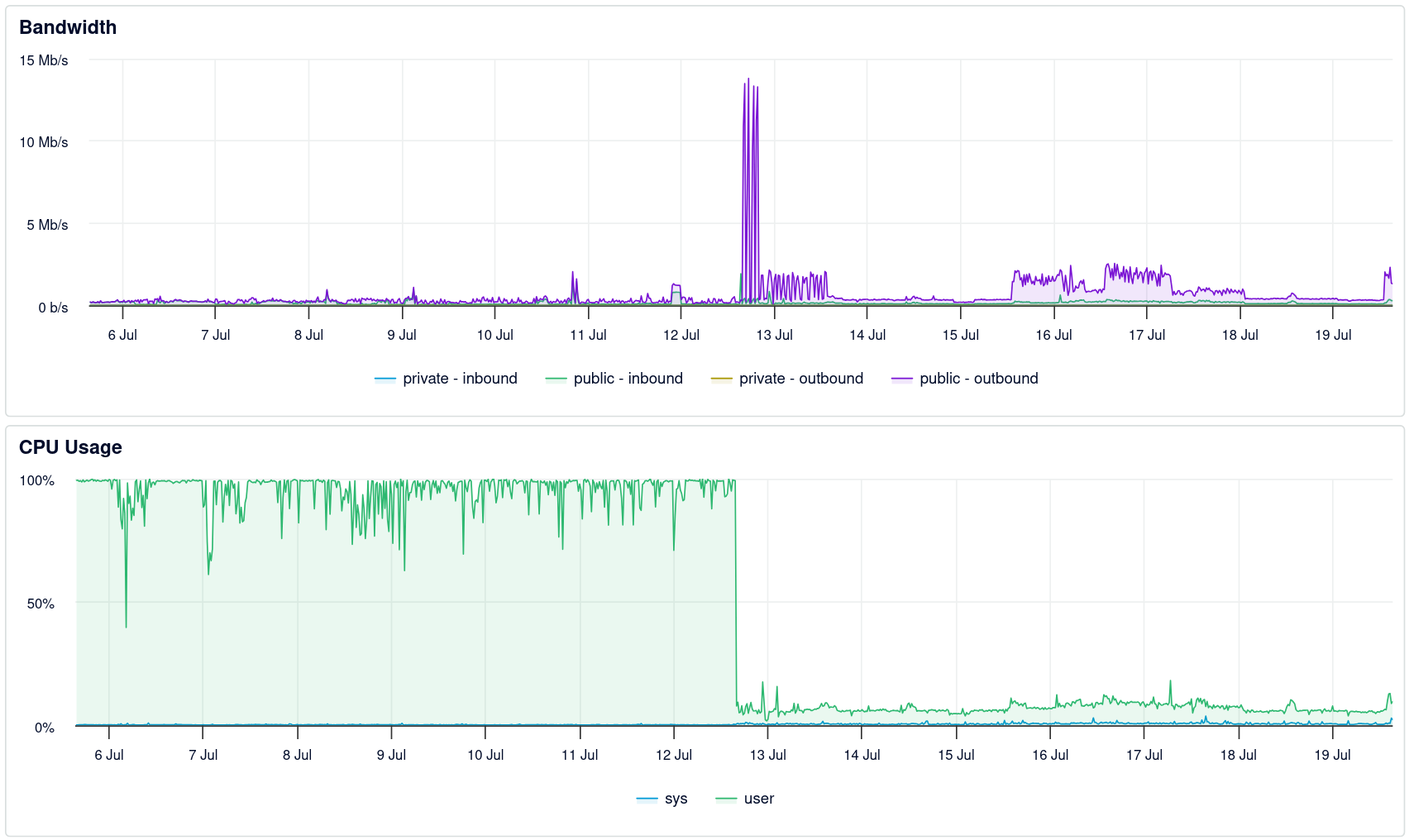
The load on the server saw immediate relief, despite a massive spike in outbound traffic now that it could actually serve all those requests instead of 502’ing left and right. The spike subsided a couple hours later, when (having been interrupted by dinner) I finished setting up Anubis.
It’s hard to say with certainty whether the spike ended because of Anubis, or if the crawlers simply happened to be sated at around the same time. However, if I’m interpreting these metrics correctly — captured on Monday, almost exactly 24 hours after I turned it on — in its first day of operation, Anubis blocked over a million requests that it believed originated from AI bots:
anubis_policy_results{action="DENY",rule="bot/ai-catchall"} 256243
anubis_policy_results{action="DENY",rule="bot/ai-clients"} 2
anubis_policy_results{action="DENY",rule="bot/ai-crawlers-search"} 3
anubis_policy_results{action="DENY",rule="bot/ai-crawlers-training"} 778359
anubis_policy_results{action="DENY",rule="bot/alibaba-cloud"} 67148
anubis_policy_results{action="DENY",rule="bot/huawei-cloud"} 492
It seems like the metrics reset whenever I restart the service, which I’ve done a few times over the past week, so I don’t have a total for the week or an average per day. Still, I think it’s fair to say this has been a worthwhile exercise.
Footnotes
I still call it “my Git server” even though the same VM now also hosts this blog and a private FreshRSS instance. I should probably call it my Git service, instead. ↩︎
Okay, yes, and a horizontal rule and the additional text “nginx/1.24.0 (Ubuntu).” I was trying to be poetic. ↩︎
Last Saturday’s error log (July 11th) is 82 MiB uncompressed (7.1 MiB compressed) and contains 207 942 entries. By contrast, yesterday’s log (July 18th) is 461 KiB uncompressed and only contains 1911 entries. ↩︎
At the time, I was publicly hosting a very-lightly-customized copy of FreshRSS, with just a couple of lines changed:
$ git diff --stat 1.29.1..1.29.1-custom
  app/Models/SimplePieCustom.php       | 3 ++-
  lib/simplepie/simplepie/src/Misc.php | 4 ++++
  2 files changed, 6 insertions(+), 1 deletion(-)
FreshRSS’s repository is much larger than any of mine; it wouldn’t shock me if web crawlers had already been hammering cgit, but the scale of the recently-added FreshRSS repo (1000ish files × 7000ish commits) is what pushed things over the edge.
I’ve decided to keep that repo private for now; partly to lower the “attack surface,” as it were, and partly because I now think I may be able to accomplish the same customization more durably with an extension. ↩︎
Actually, I could have configured Forgejo to store its repos in
/srv/gitinstead. I would still have needed to move the existing ones under adanielsubdirectory and fiddle with permissions, though, so I thought it better to use the default directory. I’m less likely to forget where things are the more my setup mirrors the official documentation. ↩︎