8BitDo’s Semi-Secret Web-Based Firmware Updater
8BitDo makes some very nice third-party controllers for Nintendo Switch and Switch 2, PC/Xbox, and a variety of vintage systems. They also partnered with Analogue to produce the official controller for the Analogue3D: a modern two-pronged Bluetooth gamepad that nonetheless preserves the N64’s button layout; an artifact whose exquisite blend of past and present speaks to me so much that I added the Expansion Pack to my Nintendo Switch Online membership in part so that I would have an excuse to get one.
As a Linux user, my one problem with 8BitDo is that their software only targets Windows, macOS, and (to a more limited degree) iOS and Android. Fortunately, I have very little reason to use their software, anyway, except that every 8BitDo controller I own has needed a firmware update to gain compatibility with the Switch 2.
Thus far, I’ve just borrowed my partner’s Windows laptop whenever I’ve gotten a new controller whose in-box firmware needed a refresh. I was aware that I could probably get the 8BitDo software working in Wine, or in a Windows VM, but either of those options always felt a little too daunting to bother with.
Still, every once in a while, I’ve continued to search online for any mention of an easy way to update 8BitDo controllers’ firmware on Linux. My last search bore some fruit: a one-month-old Reddit comment that describes, step by step, how to get the Ultimate Software V2 working with Bottles — essentially, Wine on easy mode.
I followed those directions and, while it was a little janky to use, I was quite excited to find that it worked! Only to discover, mere days later, that I needn’t have bothered: 8BitDo now has a web-based version at <web.8bitdo.com>.
It appears to support, more or less, the same set of newer devices as the Ultimate Software V2. Relevant to me, that includes the Ultimate 2 Bluetooth and the afore-mentioned 8BitDo 64, but not the original Ultimate Bluetooth, nor the GameCube controller mod kit or its corresponding receiver.
I think this must be fairly recent, and also somewhat experimental, because I
can’t find any reference to it on 8BitDo’s (English-language)
website. I found out about it from
another
Reddit comment, and a web search for "web.8bitdo.com"
(in quotes) mostly reveals various forum discussions within the last
2 – 3 months wherein Linux users share the site’s
existence with one another. In fairness, as of writing, it does say
“Ultimate Software Online v1.00 beta 20” (emphasis
mine) at the bottom of the page, but I still wish they would advertise it
just a little.
Prerequisites
Ultimate Software Online requires support for the WebUSB API, which for now means Chromium-based browsers. I’m normally a Firefox user; I installed the Chromium flatpak expressly for this purpose.
Secondly, the browser needs write access1 to 8BitDo devices. Once you select your controller, the app prompts you to run the following in a terminal:
{ cat <<EOF
SUBSYSTEM=="hidraw", ATTRS{idVendor}=="2dc8", MODE="0666", GROUP="users", TAG+="uaccess"
EOF
} | sudo tee /etc/udev/rules.d/8-bitdo-controller-beta1.rules && sudo udevadm control --reload-rules && sudo udevadm trigger
This looks a bit spooky, but it’s fairly innocuous. It creates
a udev rule that detects 8BitDo
devices specifically (vendor ID 2dc8) and sets the permissions for
those devices pretty much wide open. It seems plausible to me that the desired
effect could be achieved more narrowly, but on a single-user system I
don’t think it’s necessarily a problem to do it this way (and I
certainly don’t know how to do it any other way). Nonetheless, I
personally would advise creating the .rules file manually and
typing out both its contents and the subsequent udevadm commands
yourself, if only so you don’t get into the habit of pasting and running
random stuff off the internet without thinking.
Adding an icon to the applications menu
There’s not much point in bookmarking Ultimate Software Online in Firefox, since it doesn’t work there. It feels a little silly to have exactly one bookmark in Chromium, the browser I will use exclusively to access this web app. Wouldn’t it be nice if I could launch said app directly, the same as I would any other GUI software?
Well, it’s easy enough to launch Chromium with a specific URL from the terminal:
flatpak run org.chromium.Chromium https://web.8bitdo.com…so all I have to do is encapsulate that in a desktop entry:
[Desktop Entry]
Exec=flatpak run org.chromium.Chromium https://web.8bitdo.com
Type=Application
Terminal=false
Categories=Application;
Comment=Launch 8BitDo Ultimate Software Online using Chromium.
Name=8BitDo Ultimate Software Online
Icon=/home/daniel/.local/share/icons/256x256/8BitDo.png
I put the above in a file named
8BitDo Ultimate Software Online.desktop under
~/.local/share/applications, with of course a suitable icon saved
as ~/.local/share/icons/256x256/8BitDo.png. That’s all it
takes!
Bonus: a peek at a forthcoming product?
The first time I visited Ultimate Software Online, one of the controllers listed was named “GC Bluetooth Gamepad.” At first, I thought it was referring to the mod kit, but then I looked closer at the thumbnail image:
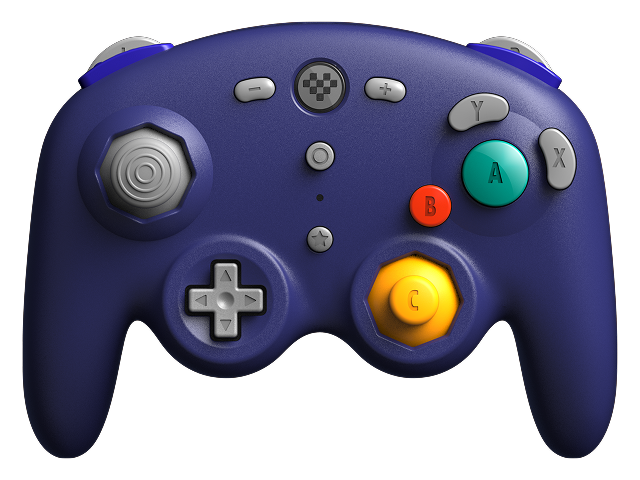
This is clearly not a modified first-party GameCube controller, but rather a whole-cloth new device blending the overall shape and button layout of the GameCube controller with signature 8BitDo-isms like the pixel-heart logo and the star button.
I haven’t been able to find any mention of this whatsoever online, and it has since disappeared from the web app. I didn’t think to take a screenshot at the time I saw it, and in fact I almost convinced myself I’d imagined the whole thing — until, that is, I managed to recover the image’s URL from Chromium’s cache:2 <https://support.8bitdo.com/bd-uploads/link/2026-04/4d049bf62a5e60771b6f9923201aa83e.png>. That URL still works as of writing, but just in case it stops working at some point, it’s also been captured by the Internet Archive.


The existence of the thumbnail image, combined with its brief appearance and subsequent disappearance from Ultimate Software Online, suggests to me that this could be something 8BitDo is working on and hasn’t announced yet. It certainly seems like an appropriate move, with the addition of GameCube titles to the Nintendo Switch Online (Expansion Pack) catalog and the introduction of Nintendo’s own NSO-exclusive replica controller. It’s easy to imagine players who might want something that feels right for GameCube games, but who don’t want to pay $70 USD3 for the official one and don’t want to deal with the fiddly business of the mod kit (or who don’t have an original GameCube controller to modify).
I likely won’t buy one myself — I did already modify an original controller, after all — but I will nonetheless be very curious to see if this materializes.
Footnotes
Recall that in Unix-like environments, “everything is a file.” A controller connected over USB shows up somewhere under the
/devfolder; the familiar read/write/execute, user/group/other permissions scheme applies. Signals sent from the device to the computer count as reads, and signals sent from the computer to the device count as writes. ↩︎For the flatpak, the cache is located in
~/.var/app/org.chromium.Chromium/cache/chromium/Default/Cache. However, the contents of that directory are a bunch of inscrutable binary files. I used Nir Sofer’s ChromeCacheViewer — a Windows-only app, for which I once again enlisted Bottles’ help — to make sense of it. ↩︎Obviously, I don’t know what this new controller will cost, assuming it even comes to market, but it’s a good bet it will be cheaper than Nintendo’s. The Ultimate 2 Bluetooth is $70 to the Switch 2 Pro Controller’s $90; the 8BitDo 64 is $40 – $45 (depending on color) to the NSO N64 controller’s $55. ↩︎